Showing posts with label Gmail Id online even after signout. Show all posts
GMAIL or GTALK ID online even after signout of the Session
  • Whether your Gmail or Gtalk Id is Online Even after signout of your chat session.
  • Whether you seeing your Gmail Id is Online in your friends chat list.
  • Just login with your other Gmail id and check that your another Email id is online.
  • Check your Chat label that your friends have send messages to you while you're offline.
  • Don't worry now it has been rectified by following simple steps given below.
Steps:
1. Be sure that you alone using your Gmail ID.
2. Check your Gmail Id Session details. Logged in Time, IP Address you used to login and the Country by clicking the details link below your Gmail.
3. Click details link. See Image shown with red box.  


Signing out of the other Gmail Session

4. Change your password. Use this link to change your password
5.  Now check whether your gmail is still online.
6. If your gmail id is online go for this option.

Click the above link and then click Launch Google Talk.

7. Now new window will open.

8. Now you can able to see chat option over there with list of friends list.
9. Just Click signout over the top and close the tab.
10. The Problem will be surely rectified.

If the problem persist post your queries as comments. I will reply you with answer.


»»  Read More
Read more!
GMAIL or GTALK ID online even after signout of the Session
  • Whether your Gmail or Gtalk Id is Online Even after signout of your chat session. 
  • Whether you seeing your Gmail Id is Online in your friends chat list.
  • Just login with your other Gmail id and check that your another Email id is online.
  • Check your Chat label that your friends have send messages to you while you're offline.
  • Don't worry now it has been rectified by following simple steps given below.
Steps:
1. Be sure that you alone using your Gmail ID.
2. Check your Gmail Id Session details. Logged in Time, IP Address you used to login and the Country by clicking the details link below your Gmail.
3. Click details link. See Image shown with red box.  

Signing out of the other Gmail Session
4. Change your password. Use this link to change your password
5.  Now check whether your gmail is still online.
6. If your gmail id is online go for this option.

Click the above link and then click Launch Google Talk.

7. Now new window will open.
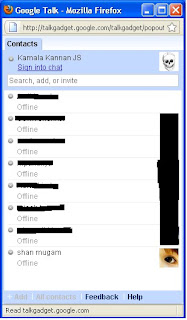
8. Now you can able to see chat option over there with list of friends list.
9. Just Click signout over the top and close the tab.
10. The Problem will be surely rectified.
If the problem persist post your queries as comments. I will reply you with answer.
Copying, Editing or Republishing this article without author permission has been strictly prohibited under Judicial act.
»»  Read More
Read more!